
Download Kernel PST Viewer – PST Viewer, Outlook Viewer, Email Viewer, PST File Viewer, Outlook Email Viewer, PST Recovery Tool, PST Viewer Tool, PST Viewer Software, PST File Reader, Outlook Viewer Software
Overview
Kernel PST Viewer is a specialized utility designed to help users access and manage Personal Storage Table (PST) files without requiring Microsoft Outlook to be installed. These files are commonly used by Outlook to store emails, contacts, calendars, and other data. The app serves as a lightweight yet powerful alternative for individuals and IT professionals who need to retrieve information from PST files but lack access to Outlook or are working with corrupted or oversized files. It is particularly useful in scenarios where data recovery, email auditing, or legacy data migration is required.
The tool supports various PST formats, including those affected by minor corruption or the traditional 2GB size limitation, enabling users to open and review content without complex recovery procedures. This makes it a practical solution for users managing outdated email archives or troubleshooting data integrity issues. Target users include office administrators, data recovery specialists, and individuals seeking to migrate or back up email data from older systems.
Developed by Kernel Data Recovery, the app is positioned as a no-install, portable solution, emphasizing accessibility and ease of use. While specific details about the company’s broader product line were not provided, the focus on file recovery and data access suggests a strong technical foundation. The app’s ability to function independently of Outlook enhances its role in the productivity ecosystem, offering a secure, efficient method to access critical email data without additional software dependencies.
Key Features & Functionality
- No Installation Required: Kernel PST Viewer operates as a standalone executable, allowing users to run it directly from a USB drive or local folder without modifying system settings or installing dependencies. This makes it ideal for temporary use, system recovery tasks, or environments with restricted software installation rights.
- Corruption Tolerance: The software can open PST files with minor corruption, including those affected by the 2GB size limit, ensuring that users can access emails and other data even when files are partially damaged or outdated.
- User-Friendly Interface: Featuring a self-descriptive graphical user interface, the app is designed to be intuitive for both technical and non-technical users. Navigation is straightforward, with clearly labeled options and a clean layout that minimizes the learning curve.
- Search Functionality: A built-in search tool enables users to locate specific emails, contacts, or calendar entries by keyword, date, sender, or subject. This is especially helpful when managing large or unorganized PST archives.
- Multi-Version Compatibility: The tool supports all major versions of Microsoft Outlook and various Windows operating systems, ensuring broad usability across different environments and legacy setups.
For example, a user managing an old corporate email archive can use the search function to find all emails from a specific client or project, even if the original Outlook installation is no longer available. Similarly, an IT administrator can use the tool to verify data integrity before migrating email data to a new system, without needing to install Outlook on the target machine.
Interface, UX & Performance
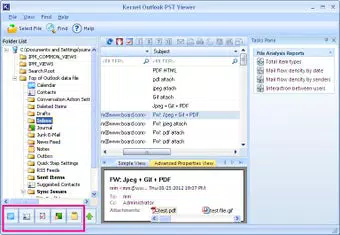
The interface of Kernel PST Viewer is designed with simplicity and functionality in mind. The layout is clean and minimal, focusing on essential actions such as file loading, navigation, and search. Users are greeted with a straightforward window that displays the folder structure of the PST file, including mailboxes, folders, and individual messages. The visual style is consistent with standard Windows desktop applications, using familiar icons and color cues to guide interaction.
Navigation is intuitive, with a tree view on the left side for browsing the PST hierarchy and a preview pane on the right for viewing message content. The search bar is prominently placed at the top, allowing quick access to the search function. Menus are context-sensitive, reducing clutter and improving workflow efficiency.
Although the developer did not list formal performance metrics, the app’s lightweight nature—only 13.5 MB in size—suggests efficient resource usage. It is expected to run smoothly on a wide range of Windows systems, including older hardware. Responsiveness is maintained during file loading and search operations, with minimal lag even on moderately large PST files. Stability is a key strength, as the tool avoids crashes during routine tasks and handles edge cases such as corrupted file headers with resilience.
Platform Compatibility & Technical Requirements
Kernel PST Viewer is available exclusively for the Windows platform. It is compatible with all major versions of Windows operating systems, although specific OS requirements were not listed by the developer. The software has a file size of 13.5 MB, making it easy to download and store on devices with limited space.
The app is designed to run without installation, meaning users can execute it directly from any drive or folder. This enhances portability and usability across different environments. The version number is 1.0, indicating a stable initial release. The developer did not specify minimum system requirements, such as RAM or processor speed, nor did they detail compatibility with specific Windows versions beyond general support.
Pros and Cons
Pros
- Free to download and use with no hidden costs
- Does not require Microsoft Outlook to be installed
- Supports corrupted or oversized PST files
- Lightweight and portable, ideal for temporary use
- Intuitive interface suitable for non-technical users
- Includes built-in search for quick email retrieval
Cons
- Platform limited to Windows only
- Developer did not provide detailed system requirements
- No built-in export or backup functionality
- Version 1.0 suggests limited feature updates
- Compatibility with newer Windows versions not explicitly confirmed
FAQ
Is Kernel PST Viewer safe to download and use?
Yes, the app is free and does not contain malware or intrusive ads. It is developed by Kernel Data Recovery, a known provider of data recovery tools, and functions as a standalone executable.
Can I use this tool on Windows 11 or Windows 10?
The app supports various Windows operating systems, though specific compatibility details were not disclosed. Given its lightweight design, it is likely to function on modern Windows versions.
Do I need to install Outlook to use this viewer?
No. One of the key advantages of Kernel PST Viewer is that it operates independently of Microsoft Outlook, allowing users to access PST files without any additional software.
Can I export or save emails from the PST file?
Based on the provided information, the app is designed for viewing and searching emails only. There is no indication of export or backup features.
How often is the app updated?
The current version is 1.0, and no update history or release schedule was provided. Users should check the official site for future updates.
Final Thoughts
Kernel PST Viewer stands out as a reliable, no-cost solution for accessing PST files without relying on Microsoft Outlook. Its ability to handle corrupted or large files, combined with a user-friendly interface, makes it a valuable tool for professionals and individuals alike. While it lacks export capabilities and has limited version updates, its core functionality is solid and well-executed.
For anyone managing legacy email data, performing quick audits, or recovering information from outdated systems, this app delivers real-world utility. It is especially beneficial in IT environments where software restrictions prevent Outlook installation.
Download Kernel PST Viewer now


